Home
Search
Reference Manuals
Return
Track Group Documentation
Users Manual for Program TRC_CDF
Table of Contents
Introduction
Input data commands
Example
Introduction
Program trc_cdf evaluates PDF(probability density function) and CDF (cumulative distribution function)
for tracks stored in trac-, trax- or trax_wdesign-format.
Input data
Input data is read in free format, valid separators between the input values are <space>,
<comma>, <tab>, <equal sign> or <carriage return>.
The commands can be written both in lower and upper case letters.
The operation of the program is controlled by the commands
described below; some of the commands also need arguments.
INFIL
- Track data file.
Declared= Character*132 Default= Blank
L_INTERVAL
- Length of track sections for which evaluation of standard deviation numbers will take place.
Declared= Real*8 Default= 200 [m]
CDF_FILE
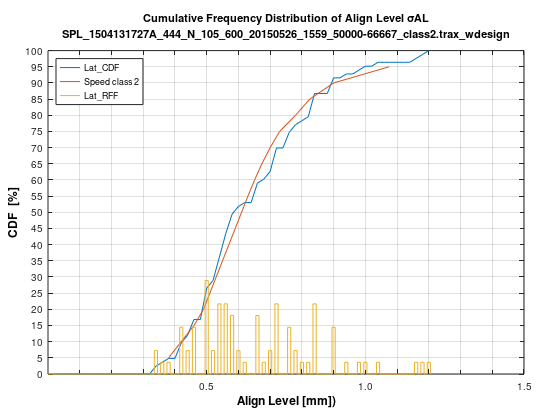
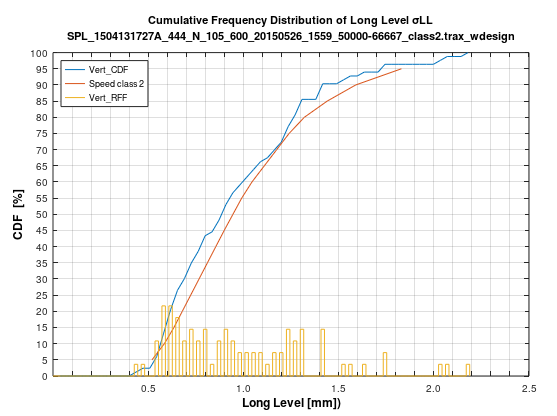
- Cumulative Distribution and Frequency Distribution of the track.
The file is written as an m-file and can be executed in program Octave.
Declared= Character*132 Default= Blank (I.e. no file will be written)
XSTART_KM
- Starting kilometer when analyzing the track irregularity file.
Declared= Integer*4 Default= -1000000000 [km]
XSTART_M
- Starting meter in XSTART_KM when analyzing the track irregularity file.
Declared= Integer*4 Default= -1000 [m]
XSTOP_KM
- End kilometer when analyzing the track irregularity file.
Declared= Integer*4 Default= 1000000000 [km]
XSTOP_M
- End meter in XSTOP_KM when analyzing the track irregularity file.
Declared= Integer*4 Default= 1000 [m]
Example of an input data file
Following example: Master.trc_cdff can be
used as a master file:
##
##      Input data for program trc_cdf
##

 L_INTERVAL= 200        # For speeds lower than  140 km/h

 XSTART_KM=   0         XSTART_M= 0
 XSTOP_KM = 1000000000  XSTOP_M = 0

 INFIL= K2_4a25-g-k.trac
 CDF_FILE= K2_4a25-g-k.trc_cdfr
Output results: